728x90

브라우저가 HTML을 읽다가 <script> 태그를 만나면 HTML 파싱을 멈추고 <script>를 먼저 실행합니다. 

이때문에 DOM 객체 생성이 중단되고 사용자는 HTML 이 다 파싱될 때까지 UI를 사용하지 못하는데 


<script src> src 속성을 가져 파일을 다운받아오는 script태그는 다운로드가 오래 걸리면 다운로드가 완료될때까지 

파싱이 지연되게 됩니다.


이를 해결하기 위해 <script> 태그를 body 끝부분에 위치시키거나

defer 속성을 사용합니다. 


script src 는 태그 순서대로 실행되기로 되어있고 

다운로드가 먼저끝나더라도 실행은 태그의 위치 순서에 따른다.


defer 속성을 사용하면 script를 백그라운드에서 병렬적으로 다운로드 받고 HTML을 멈추지 않고 계속 파싱합니다.


<script defer src="small.js">


'Javascript' 카테고리의 다른 글

JQuery 입문  (1) 2023.09.22
JQuery 이해하기  (0) 2023.09.22
CSS 선택자를 이용한 HTML DOM 객체 Handling  (0) 2023.09.18
Javascript intermediate  (0) 2023.09.18
Javascript Event  (0) 2023.09.17
728x90

RestApi method


GET 서버의 리소스에 접근
POST 서버에 데이터 전송
PUT 서버의 리소스를 갱신
DELETE 서버의 리소스 삭제


URI 맵핑 

site/items/sub-items/pk

 기존에 uri를 설계할 때는 'site/items_service' 처럼 자원과 그 행위를 표현하는 방식을 많이 사용했는데 

RestApi는 행위는 RequestMethod로 충분하고

- URI는 자원을 표현한다. 

- /은 자원의 계층관계를 나타내고 URI 마지막에 붙이지 않는다. 

- _은 사용하지 않는다. -은 가독성을 위해 사용할 수 있다.

-  소문자를 사용한다. 

- 파일 확장자.xx는 사용하지 않는다. 

- 컬렉션(집합)자원은 s(복수형)을 붙이고, 다큐먼트(객체) 자원은 단수형을 사용하면 직관적인 설계가 될 수 있다.


HTTP 응답상태 코드 

- 2xx : 정상적 응답

- 301 : redirect 된 경우 

- 4xx : 클라이언트의 부적절한 요청에 대한 응답 

- 500 : 서버측에 문제 발생


RestController

@GetMapping(value = "/guests",produces = MediaType.APPLICATION_JSON_UTF8_VALUE)

public Map<String,Object> guest_list()throws Exception{

Map<String, Object> resultMap=new HashMap<String, Object>();

int status=1;

String msg="성공";

List<Guest> data=new ArrayList<Guest>();

data=guestService.selectAll();

resultMap.put("status", status);

resultMap.put("msg", msg);

resultMap.put("data", data);


return resultMap;

}

@GetMapping(value = "/guests/{guest_no}",produces = MediaType.APPLICATION_JSON_UTF8_VALUE)

public Map<String,Object> guest_detail(@PathVariable(value = "guest_no") int guest_no )throws Exception{

Map<String, Object> resultMap=new HashMap<String, Object>();

int status=1;

String msg="성공";

List<Guest> data=new ArrayList<Guest>();

Guest guest=guestService.selectByNo(guest_no);

if(guest!=null) {

data.add(guest);

}else {

status=2;

msg="게시물이 존재하지않습니다.";

}


resultMap.put("status", status);

resultMap.put("msg", msg);

resultMap.put("data", data);


return resultMap;

}

guests URI 에 파라메터를 받아서 queryString으로 맵핑하지 않고 

guests/{guest_no}로 guest_no를 URI PathVariable로 받아서 맵핑한다. 

@PostMapping(value = "/guests",produces = MediaType.APPLICATION_JSON_UTF8_VALUE)

public Map<String,Object> guest_write_action(@RequestBody Guest guest){

Map<String, Object> resultMap=new HashMap<String, Object>();

int status=1;

String msg="성공";

List<Guest> data=new ArrayList<Guest>();

try {

int insert_guest_no=guestService.insertGuest(guest);

status=1;

msg="성공";

Guest newGuest=guestService.selectByNo(insert_guest_no);

data.add(newGuest);

} catch (Exception e) {

status=2;

msg="방명록쓰기실패";

e.printStackTrace();

}


resultMap.put("status", status);

resultMap.put("msg", msg);

resultMap.put("data", data);

return resultMap;

}

동일한 guests URI에 POST 방식으로 요청을 보내는 컨트롤러 

Model이나 Request Param이 아닌 

RequestBody 어노테이션을 사용

@Operation(summary = "방명록수정",description = "전송되는아이디에해당하는 게시물수정")

@Parameter(name = "guest_no",description = "방명록의번호")

@PutMapping(value = "/guests/{guest_no}")

public Map<String,Object> guest_modify_action( @PathVariable("guest_no") int guest_no,

@RequestBody Guest guest)throws Exception{

Map<String, Object> resultMap=new HashMap<String, Object>();

int status=1;

String msg="성공";

List<Guest> data=new ArrayList<Guest>();

guest.setGuest_no(guest_no);

guestService.updateGuest(guest);

data.add(guest);


resultMap.put("status", status);

resultMap.put("msg", msg);

resultMap.put("data", data);


return resultMap;

}

Put 방식으로 맵핑

//@ExceptionHandler(Exception.class)

public Map<String,Object> exceptionHandler(Exception e){

Map<String, Object> resultMap=new HashMap<String, Object>();

int status=3;

String msg="알수없는예외";

List data=new ArrayList();

data.add(e.getMessage());


resultMap.put("status", status);

resultMap.put("msg", msg);

resultMap.put("data", data);

return resultMap;

}

Exception이 발생할 때 처리할 Controller도 다른 RestController와 같은 형식을 갖는다. 


HTTP 요청시 Content-Type 

 - text타입 : text/css, text/plain, text/javascript, text/html

 - file : multipart/form-data

 - application : application/json, application/x-www-urlencoded


application/json 

{key : value}


application/x-www-urlencoded

key=value&key=value

html의 form의 기본 content-type 

'Java > Spring Boot' 카테고리의 다른 글

JPA 계층형 게시판  (0) 2023.10.10
Spring Data JPA begins  (0) 2023.10.06
Spring addViewControllers  (0) 2023.09.14
Thymeleaf in Spring  (0) 2023.09.14
Spring Interceptor  (0) 2023.09.14
728x90

기본 HTML 구조

<html>

<head>

<!-- 문서 정보 -->

<meta charset="UTF-8">

<title>html문서구조</title>

<style>

/*스타일 정의*/

</style>

<script>

<!-- 스크립트 정의 -->

</script>

</head>

<body>

<!-- 문서의 내용 -->

</body>

</html>

<html> 태그로 시작

<head>문서정보</head>

<body>컨텐츠</body>

</html> 태그로 문서 끝 


Block Element VS Inline Element

블록태그는 위에서 아래로 배치되는 태그이다. 

블록 태그의 다음 태그는 블록태그의 아래 위치한다. 

ex) div, p, h1~6, ul, li, table, form


인라인태그는 옆으로 배치되는 태그이다.

인라인태그는 같은 줄의 옆으로 배치된다.

ex) img, span, a


<div> 태그 

영역을 표시하는 마크업 


float:left >>블록 태그라 옆으로 배치되지 않지만 스타일에서 float 속성을 left로 주어 좌측 영역 차지 

<div style="border:solid 1px;width:250px;height:350px;float:left">


<p> 태그

문단을 표시하는 마크업

<div>영역</div>

<p>문단</p>


<ul>, <ol>, <li> 태그

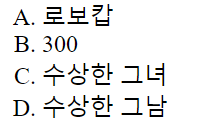
<ul> : 순서가 없는 태그, 리스트의 머리말에 모양을 정할 수 있다.

<ol> : 순서가 있는 태그, 순서의 표시 형식을 정할 수 있다. 

<li> : 리스트의 요소 태그 

<ol type="A">

<li>로보캅</li>

<li>300</li>

<li>수상한 그녀</li>

<li>수상한 그남</li>

</ol>

<ul type="circle">

<li>한화-기아</li>

<li>NC-삼성</li>

<li>두산-롯데</li>

</ul>


<li style="display: inline;"><a href = "#">회원</a>

<li style="display: inline;"><a href = "#">주문</a>

style="display: inline"으로 인라인으로 출력할 수 있다. 


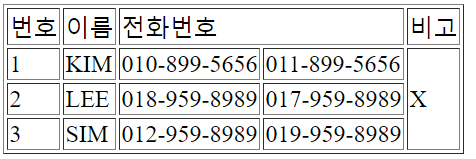
<table>태그

<tr> 태그 : 행

<td> 태그 : 열

colspan = " column (열) 을 합친다."

rowspan = " row () 을 합친다."

<table border="1">

<tr>

<td>번호</td>

<td>이름</td>

<td colspan="2">전화번호</td>

<td>비고</td>

</tr>

<tr>

<td>1</td>

<td>KIM</td>

<td>010-899-5656</td>

<td>011-899-5656</td>

<td rowspan='3'>X</td>

</tr>

<tr>

<td>2</td>

<td>LEE</td>

<td>018-959-8989</td>

<td>017-959-8989</td>


</tr>

<tr>

<td>3</td>

<td>SIM</td>

<td>012-959-8989</td>

<td>019-959-8989</td>


</tr>

</table>


<span>태그

컨텐츠를 표시하는 액자 역할, 컨텐츠이 표시 방법 제어하는 인라인 태그

<span style="color: red;font-size: large;font-weight: bold;border: 1px solid;">

테스트 문자열

</span>

<span style="font-style: italic;border: 1px solid;">span태그</span>를 이용해서 표시합니다.


<iframe>태그

윈도우 안에 frame을 생성하는 태그

<iframe src="http://www.daum.net"

width="800px" height="200px"></iframe>


<form> 태그

form 에서 데이터를 입력받아 url로 데이터를 보낼 수 있다. 

action = "url"

method= "requestMethod"

<input> 태그 

<form action="#" method="post">

<!-- 한 줄 짜리 키보드 입력 요소 -->

<input type="text" style="width:400px" />

<!-- 비밀번호 입력 요소 : 입력하는 동안 입력 문자가 표시되지 X -->

<input type="password" style="width:400px" />


<!-- 배타적 단일 선택 입력 요소 (radio button) -->

<!-- 배타적 단일 선택이 되려면 각 radio가 같은 name을 가져야 합니다. -->

<input type="radio" name="gender" />

<input type="radio" name="gender" checked="checked" />


<!-- 다중 선택 입력 요소 (checkbox) -->

<input type="checkbox" />IT

&nbsp;&nbsp;&nbsp;

<input type="checkbox" />경제

&nbsp;&nbsp;&nbsp;

<input type="checkbox" />정치

&nbsp;&nbsp;&nbsp;

<input type="checkbox" />문화

&nbsp;&nbsp;&nbsp;

<input type="checkbox" />연예


<!-- button : 버튼 모양, 자바스크립트와 연결을 위해 사용 -->

<input type="button" value="눌러주세요" />

<!-- reset : 초기화, 최초 페이지 로딩할 때 상태로 전환 -->

<input type="reset" value="초기화" />

<!-- image : 이미지 입힌 버튼 모양, 서버로 데이터 전송 -->

<input type="image" src="../image/btn.jpg" />

<!-- submit : 버튼 모양, 서버로 데이터 전송 -->

<input type="submit" value="서버로 전송" />


</form>


type : text, password, radio, checkbox, button, reset, image, submit

radio = > name 이 같은 radio 끼리는 1개만 선택할 수 있다.

checkbox = > 다중 선택

button = > 자바스크립트로 action 처리 가능한 버튼 

reset = > input의 모든 데이터를 reset하는 버튼

submit = > input의 모든 데이터를 서버로 전송하는 버튼, 클릭시 submit 이벤트 발생

image = > 이미지를 입힌 submit 버튼 


<textarea> 태그 

여러줄의 텍스트 input 

<!-- 여러 줄 키보드 자유 입력 요소 -->

<!-- 반드시 시작 태그와 종료 태그 쌍으로 작성 -->

<textarea rows="10" cols="55"></textarea>

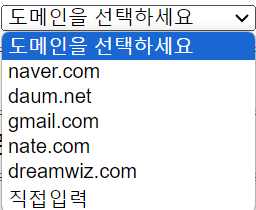
<select> 태그 

select 태그 내 <option> 태그에 선택사항을 입

<select style="width:170px">

<option>도메인을 선택하세요</option>

<option>naver.com</option>

<option>daum.net</option>

<option>gmail.com</option>

<option>nate.com</option>

<option>dreamwiz.com</option>

<option>직접입력</option>

</select>


<a> 태그 

다른 페이지로 이동하는 태그 

href = "url"

target = "페이지를 이동할 타겟 윈도우"

 - _blank : 새창

 - _self : 현재창


절대경로 http://*

<a href="http://www.google.com" target="_blank">


상대경로 

기준경로==> 현재 리소스 url 중 리소스 이름을 제외한 주

>> 다른 위치의 리소스

<a href="../images/penguin1.gif">

>> 동일한 위치의 리소스 ./생략가능

<a href="./02.head.html">


페이지 내 지정 위치

<a href="http://www.naver.com#top">

naver의 #top 위치

<a href="#top">

현재 페이지의 #top 위치

<a href="#">

현재 페이지의 최상단으로 이동


<img> 태그

src = "url" 

<img src="../tomcat.gif" width="50" height="50">


html 문서 내에서 여러개의 공백, 탭, 줄바꿈 실제론 하나의 공백으로 출력된다. 


<br> 내려쓰기 

내려쓰기로 출력하려면 <br> 태그를 사용해야한다.

문장<br>

&nbsp; 띄어쓰기

명시적으로 띄어쓰기 출력하려면 &nbsp; 사용

&nbsp;&nbsp;&nbsp;&nbsp;

<, > == &lt; &rt;

&lt;, &rt;


<pre>태그 

공백, 탭, 줄바꿈 등 태그 내의 내용을 모두 그대로 출력한다. 


<h1~6>태그 

제목 마크업,  h1이 가장 크다. h6이 가장 작고 그 이상 존재하지 않는다. 

<h1>제목 표시 마크업</h1>

<h2>제목 표시 마크업</h2>

<h3>제목 표시 마크업</h3>

<h4>제목 표시 마크업</h4>

<h5>제목 표시 마크업</h5>

<h6>제목 표시 마크업</h6>

<hr> 태그 

수평가로선 

보통 제목 밑에 혹은 컨텐츠가 바뀌는 부분을 구분하기 위해 사용


'Web' 카테고리의 다른 글

YAML Converter  (0) 2023.10.11
SPA(single page application) Handlebars 활용하기  (1) 2023.09.21
Mybatis Mapper  (0) 2023.09.19
MyBatis Config  (0) 2023.09.19
AJAX Asynchronous Javascript And XML  (0) 2023.09.18
728x90

xml에서 설정

<?xml version="1.0" encoding="UTF-8"?>

<!DOCTYPE mapper PUBLIC "-//mybatis.org//DTD Mapper 3.0//EN" "http://mybatis.org/dtd/mybatis-3-mapper.dtd">

<mapper namespace="com.mybatis3.dao.mapper.StudentMapper">

         <resultMap id="studentResultMap" type="com.mybatis3.domain.Student">    

         <select id="findStudentByIdMap">

</mapper>

mapper의 namespace = "mapper의 위치"


<resultMap>

type: DB로 부터 받은 데이터 result를 바인딩할 java의 클래스 

<resultMap id="studentResultMap" type="com.mybatis3.domain.Student">

<id column="STUD_ID" property="studId"/>

<result column="NAME" property="name"/>

<result column="EMAIL" property="email"/>

<result column="DOB" property="dob"/>

</resultMap>

id = primaryKey

result = 나머지

column="데이터베이스의 컬럼명"

property="자바 클래스의 변수명" 


<resultMap id="studentWithAddressResultMap" type="com.mybatis3.domain.Student" autoMapping="true">

autoMapping = id, result를 직접 바인딩하지 않아도 column과 property를 비교하여 알아서 바인딩 해준다. 

다만, 하나의 클래스가 다른 클래스를 포함하고 있거나 컬렉션으로 갖는 경우 

id는 직접 기술해주어야하며, 

포함하고 있는 다른 클래스에 동일한 변수명을 가진 property가 있다면 또한 명시해주어야 한다. 


하나의 클래스가 다른 클래스를 포함하고 있는 경우 

<resultMap id="studentWithAddressResultMap" type="com.mybatis3.domain.Student" autoMapping="true">

<id column="STUD_ID" property="studId"/>

<association property="address" javaType="com.mybatis3.domain.Address" autoMapping="true">

<id column="ADDR_ID" property="addrId"/>

</association>

</resultMap>

<association> javaType="포함되는 클래스"


하나의 클래스가 다른 컬렉션을 포함하고 있는 경우

<resultMap id="studentWithCoursesResultMap" type="com.mybatis3.domain.Student" autoMapping="true">

<id column="STUD_ID" property="studId"/>

<result column="STUDENT_NAME" property="name"/>

<collection property="courseList" ofType="com.mybatis3.domain.Course" autoMapping="true">

<id column="COURSE_ID" property="courseId"/>

<result column="COURSE_NAME" property="name"/>

</collection>

</resultMap>


<collection> ofType="포함되는 컬렉션의 클래스"

동일한 프로퍼티를 가진 경우, <result>로 따로 맵핑해준다.


sql문도 작성 가능

<insert id="insertStudentBySequenceReturnPrimaryKey" parameterType="com.mybatis3.domain.Student">

<selectKey keyProperty="studId" order="BEFORE" resultType="int">select students_stud_id_seq.nextval from dual</selectKey>

insert into students(stud_id,name,email,dob) values(#{studId},#{name},#{email},#{dob})

</insert>

parameterType="insert시 필요한 파라메터의 타입"

<selectKey> insert시 sequence를 사용하여 pk를 초기화한다면 

insert후 insert한 데이터의 pk를 바로 반환 받기 위해 사용 

select students_stud_id_seq.nextval from dual

seq.nextval로 다음 seq 값을 미리 알아낸 후 

insert 할때는 seq.currval 값으로 insert 한다. 

파라메터를 넣을 땐 #{...property...} 표현식을 사용한다.


mybatis 사용

* 0. mybatis-config.xml --> InputStream

InputStream myBatisConfigInputStream = Resources.getResourceAsStream("mybatis-config.xml");

* 1. SqlSessionFactoryBuilder

SqlSessionFactoryBuilder sqlSessionFactoryBuilder=new SqlSessionFactoryBuilder();

* 2. SqlSessionFactory

SqlSessionFactory sqlSessionFactory=sqlSessionFactoryBuilder.build(myBatisConfigInputStream);

* 3. SqlSession open (Connection) autocommit true

SqlSession sqlSession=sqlSessionFactory.openSession(true);

* 4. SqlSession사용(CRUD)

//List<Student> studentList=sqlSession.selectList("com.mybatis3.dao.mapper.StudentBasicMapper.findAllStudents");

Student student=sqlSession.selectOne(

"com.mybatis3.dao.mapper.StudentBasicMapper.findStudentById",1);

* 5. SqlSession close

sqlSession.close();

sqlSessionFactory.open(autocommit true?)


sqlSession 메소드

selectOne()  객체 한개 반환 받을 때 

selectList() 객체 컬렉션을 반환 받을 때

insert(), update(), delete()


sqlSession.method(namespace+sql태그 id, 파라메터)


interface 에서 설정

-인터페이스의 풀네임은 Mapper.xml의 namespace와 일치

-메소드 이름은 Mapper.xml의 id와 일치

-메소드 인자타입은 Mapper.xml의 parameterType과 일치

-메소드 리턴타입은 Mapper.xml의 resultType과 일치 


@Select("select stud_id as studid,name,email,dob from students where stud_id = #{studId}")

public Student findStudentById(@Param("studId")Integer studId);

어노테이션으로 sql문을 .xml 파일 대신 Mapper인터페이스에서 작성할 수 있다. 


Mapper interface 사용

* 0.mybatis-config-mapper-interface.xml --> InputStream

InputStream myBatisConfigInputStream = Resources.getResourceAsStream("mybatis-config-mapper-interface.xml");

* 1. SqlSessionFactoryBuilder

SqlSessionFactoryBuilder sqlSessionFactoryBuilder=new SqlSessionFactoryBuilder();

* 2. SqlSessionFactory

SqlSessionFactory sqlSessionFactory=

sqlSessionFactoryBuilder.build(myBatisConfigInputStream);

* 3. SqlSession open (Connection ) autocommit true

SqlSession sqlSession=sqlSessionFactory.openSession(true);

* 4. StudentMapper[MapperInterface]생성

* org.apache.ibatis.binding.MapperProxy

StudentBasicMapper studentBasicMapper

=sqlSession.getMapper(StudentBasicMapper.class);

* 4. StudentMapper[MapperInterface]사용(CRUD)

Student student = studentBasicMapper.findStudentByNo(1);

* 5. SqlSession close

sqlSession.close();

sqlSession을 얻는것까진 동일 


인터페이스는 직접 사용하지 못하고 인터페이스를 상속받아 구현한 클래스를 사용해야 한다. 

Mapper는 인터페이스이므로 Mapper를 구현한 클래스를 가져와야하는데 

sqlSession의 getMapper가 이러한 일을 대신해준다. 

이를 Proxy라고 한다. 

Mapper mapper = sqlSession.getMapper(Mapper.class);

mapper.메소드를 이용해 인터페이스에서 만든 메소드를 사용할 수 있다. 


Dao에서 Mapper 사용하기 예제

public class AddressDao {

private SqlSessionFactory sqlSessionFactory;

private static final String NAMESPACE ="com.mybatis3.dao.mapper.AddressMapper.";

public AddressDao() {

try {

InputStream myBatisConfigInputStream = Resources.getResourceAsStream("mybatis-config.xml");

SqlSessionFactoryBuilder sqlSessionFactoryBuilder = new SqlSessionFactoryBuilder();

this.sqlSessionFactory = sqlSessionFactoryBuilder.build(myBatisConfigInputStream);

} catch (Exception e) {

e.printStackTrace();

}

}

sqlSession이 아닌 factory를 필드로 갖고 매번 factory에서 sqlSession을 가져다 쓰고 반납한다. 

Dao 생성자에서 sqlSessionFactory를 생성해준다.


public Address findAddressByIdWithStudents(Integer addrId) {

SqlSession sqlSession= sqlSessionFactory.openSession(true);

Address address=sqlSession.selectOne(NAMESPACE+"findAddressByIdWithStudents",addrId);

sqlSession.close();

return address;

}
'Web' 카테고리의 다른 글

YAML Converter  (0) 2023.10.11
SPA(single page application) Handlebars 활용하기  (1) 2023.09.21
HTML5 Basic  (0) 2023.09.19
MyBatis Config  (0) 2023.09.19
AJAX Asynchronous Javascript And XML  (0) 2023.09.18

+ Recent posts